
Using Rendero
- What to bring
- A sketch, clay render, model-view export or existing image saved as PNG, JPG or WebP.
- What you can do
- Generate an image from your source, then guide revisions with prompts, selected regions and the reference options supported by your engine.
- What to check
- Compare the camera, openings and material boundaries with the source. Apply accepted design changes to your model and project documents.
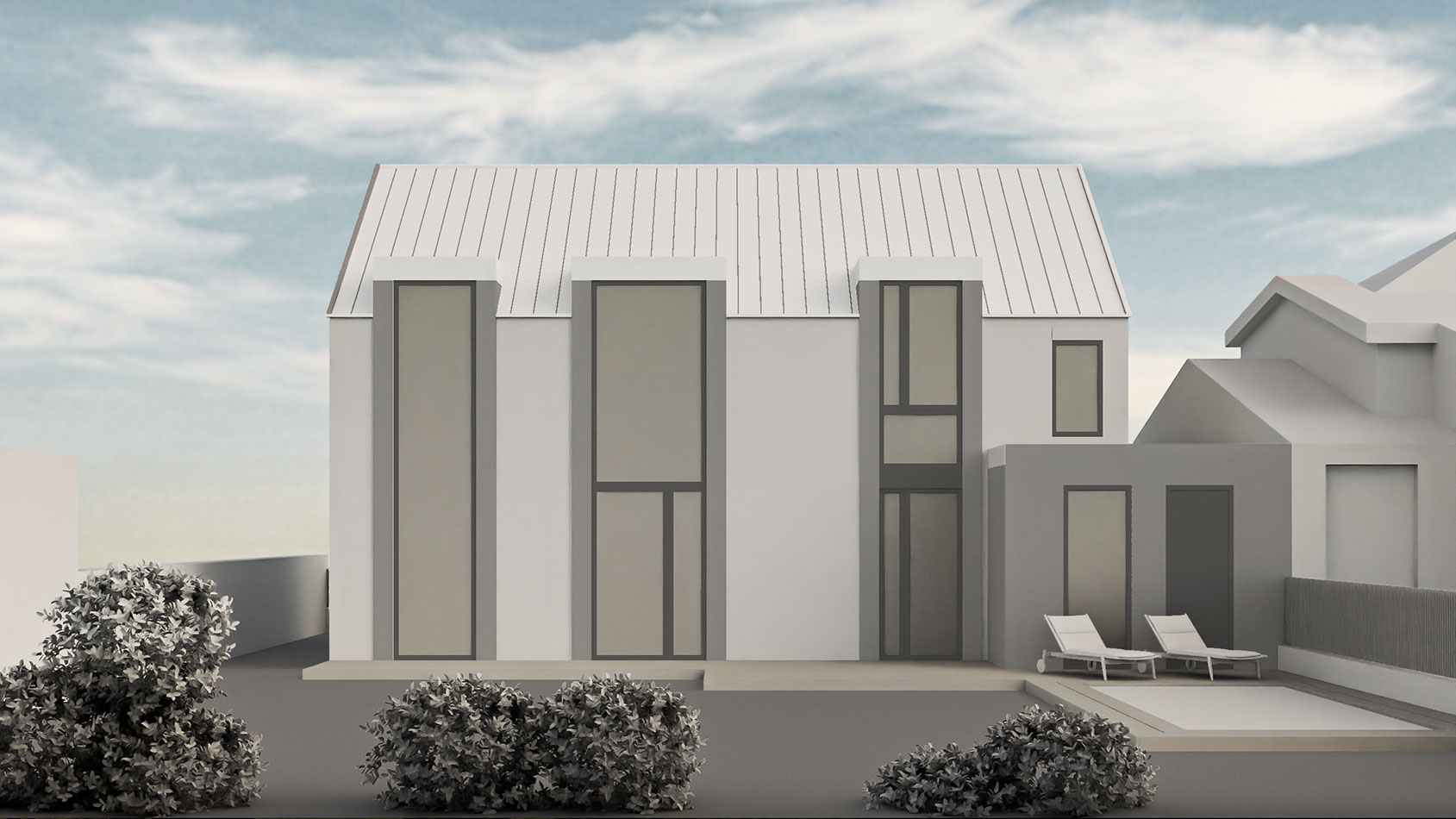
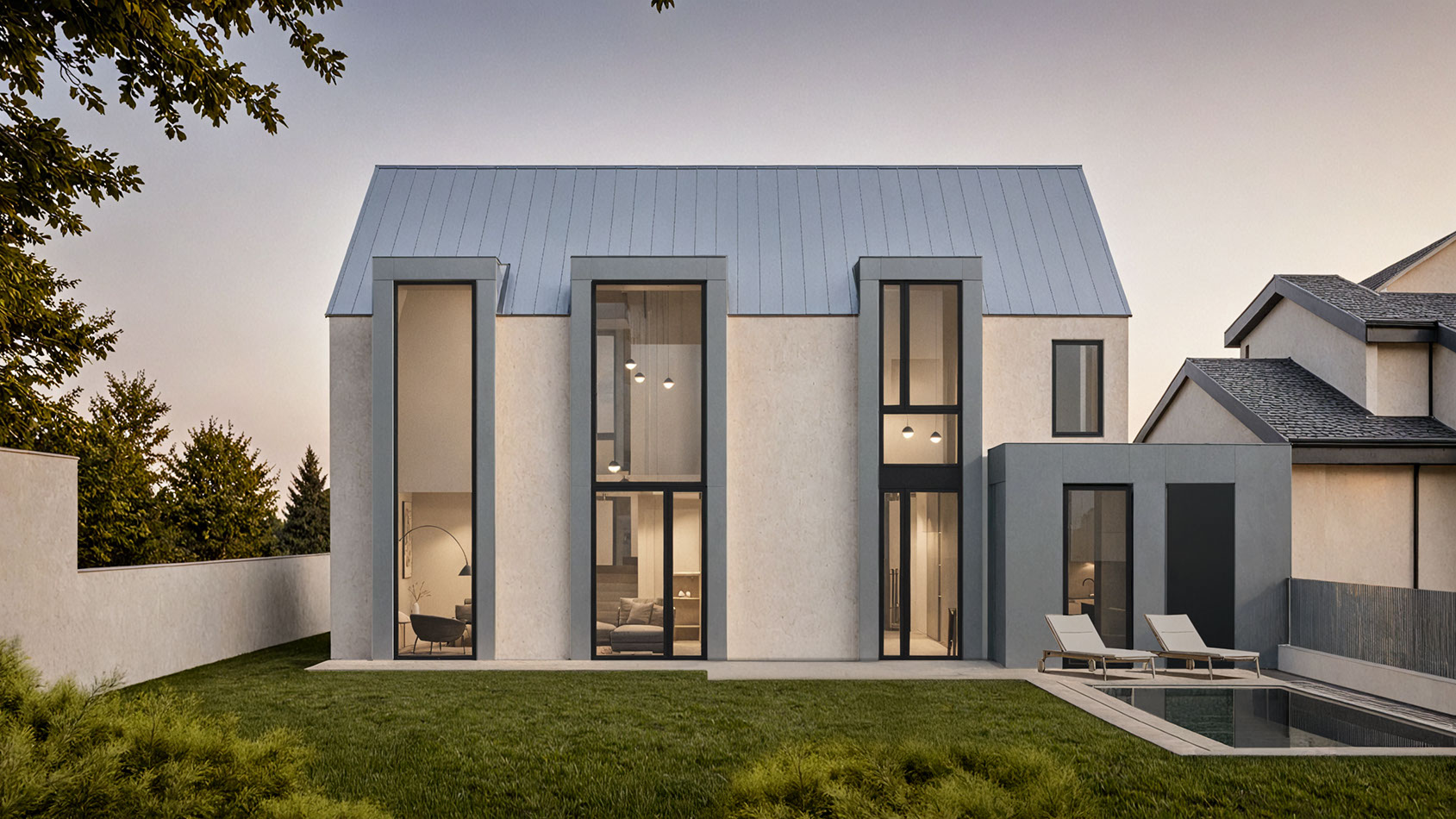
Published Rendero model and presentation images of the same facade. The original prompt, engine, settings, attempts, time and credit use were not recorded with these files. Inspect the facade example and its evidence limits
Inspect two published source-view examples
How credits work
Free accounts receive 50 starting credits once at signup. These credits do not refill each month.
Rendering charges vary with the model, resolution and, for some engines, processing time. Upscaling uses additional credits. The app shows your remaining balance.
Allow for retries and edits when planning a project. A credit balance does not represent a fixed number of finished images.
Quick verdict
Rendero is a browser-based, image-in / image-out tool for segmentation-guided edits on an exported sketch, clay render or model view — not a live BIM-plugin or model-viewport integration like ArkoAI or Veras AI, and not a real-time production renderer like D5 Render.
Best for
- Iterating on an exported sketch, clay render or model view from any modeling tool
- Segmentation-guided edits to a selected area, checked against your source
- Comparing several AI engines on the same source image before committing to one
Not ideal for
- A live in-viewport, BIM-plugin workflow inside SketchUp, Rhino or Revit — see ArkoAI or Veras AI
- Real-time production scenes, animation or repeatable camera output — see D5 Render
- Assuming every engine and resolution is on every plan — check your plan first
Published by Rendero. This guide compares documented inputs, editing controls and outputs. We have not measured comparative speed, cost or image quality.
The tools cover browser image editing, modeling plugins and scene-based rendering. We selected them to show those different routes, rather than rank the whole market. Related comparisons also cover Midjourney, PromeAI, ArchRender and Archmaster.
Working mainly on interiors rather than whole buildings? See the AI rendering software comparison for interior designers instead.
Start with the source you already have
An exported image
A sketch, clay view or photograph can feed an image-based workflow.
A model viewport
A supported integration keeps image generation close to your modeling application.
A production scene
A real-time renderer keeps cameras, materials and geometry in a 3D scene.
Compare the workflows
Open the full workflow specification table
| Tool | Workflow | Workflow to consider | What to check |
|---|---|---|---|
| Rendero | Browser, image in / image out | Image edits from mixed architectural inputs | You work from an exported view rather than a live BIM model |
| Veras AI | Web app and design-software integrations | Image generation within a Chaos workflow | Generated details still need architectural review |
| Gendo | Browser, shared project canvas | Sketches, model exports, references and region-based edits | Included seats, collaboration and editing controls for your workflow |
| ArkoAI | SketchUp, Rhino, and Revit plugins | Style studies from a model view | Host version and operating-system compatibility |
| Vizcom | Web and tablet design canvas | Sketch-first concept exploration | Whether the next step needs an image or 3D geometry |
| ArchiVinci | Browser, module-based workflow | Many interior, exterior, and editing tasks in one place | Which actions use included renders and which use coins |
| MyArchitectAI | Browser, image-based workflow | Stills, edits, enhancement, and animation | It is not a live model or BIM environment |
| Rendair | Browser, multiple input modes | Sketch, elevation, 3D-base, and image variations | Credit use matters when a team iterates heavily |
| mnml.ai | Browser, image-based rendering and editing | Sketches, model views, references and natural-language edits | Editing behavior and credit use on a representative input |
| PromeAI | Browser, image-based workflow | Sketches, photos, model screenshots and text, depending on the tool | Compare the generated image with the source design |
| D5 Render | Desktop real-time renderer with AI tools | Production scenes, animation, and final output | More scene setup and hardware commitment than image-in AI tools |
Rendero
Browser, image in / image out
Inputs, controls and considerations
Rendero works from sketches, clay renders, exported model views, existing visuals and reference images. Its architectural workflow combines segmentation, reference-image guidance and a choice of AI engines for image generation and selected-area refinement.
Segmentation helps define where an edit should happen. Check generated openings, proportions, materials and details against the source design before presentation. Available engines and resolutions depend on your Rendero plan. Read the product facts and limitations.
Veras AI
Web app and design-software integrations
Inputs, controls and considerations
Veras AI offers a web application and integrations with supported design software. It accepts sketches, images and model views. Selection and geometry controls depend on the engine and version, so confirm the specific workflow your installation supports.
Chaos documents Smart selection for local edits as well as web and host-based workflows. Check your installed version before comparing its controls. See our Rendero vs Veras AI comparison.
Gendo
Browser, shared project canvas
Inputs, controls and considerations
Gendo brings sketches, model exports, references and generated images together on a shared canvas. It also provides region selection for material changes, chat-based editing, parallel rendering and upscaling.
Gendo keeps source files, references and generated versions on a canvas. Compare editing seats with viewer access when deciding who needs to participate in a project. See our Rendero vs Gendo comparison.
ArkoAI
SketchUp, Rhino, and Revit plugins
Inputs, controls and considerations
ArkoAI focuses on plugins for SketchUp, Rhino, and Revit. Its download page lists compatibility by host version and operating system.
The plugin serves the person preparing a view in a supported application. Colleagues working from images may still need an export handoff. See our detailed Rendero vs ArkoAI comparison.
Vizcom
Web and tablet design canvas
Inputs, controls and considerations
Vizcom supports sketch-based design, existing images, 3D model visualization and natural-language image edits. Its documentation also describes material changes, generating 3D from 2D and team workspaces.
Vizcom documents lasso, brush, Bezier and auto selection for local edits. Its model import and 2D-to-3D tools also support work involving geometry. See our Rendero vs Vizcom comparison.
ArchiVinci
Browser, module-based workflow
Inputs, controls and considerations
ArchiVinci offers dedicated workflows for interiors, exteriors, landscape, floor plans, masterplans, furnishing, local edits, relighting, style changes, and more.
ArchiVinci separates included rendering allowances from coin-based features. Check the module and engine used by each action when estimating a project's usage.
MyArchitectAI
Browser, image-based workflow
Inputs, controls and considerations
MyArchitectAI is an image-first browser tool covering photorealistic rendering, natural-language edits, enhancement, high-resolution output, and animation.
Its documented editing workflow lets you select an area, describe a change and supply a material reference. Keep the source model available for checking any generated openings or junctions.
Rendair
Browser, multiple input modes
Inputs, controls and considerations
Rendair explicitly separates text-to-render, elevation-to-render, 3D-base-to-render, sketch-to-render, and image-to-render workflows. It also includes regional image editing, variations, upscaling, and video.
Include retries, local edits and exports when tracking credit use. Record how many attempts it takes to reach an image you can accept for the intended presentation.
mnml.ai
Browser, image-based rendering and editing
Inputs, controls and considerations
mnml.ai works from sketches, model screenshots and images. Its published features include style and reference guidance, natural-language image editing, upscaling and project collaboration.
Its Studio tools include Select, Mask and Edit, and Mask & Inpaint. Project permissions separate viewing, downloading and editing. See our Rendero vs mnml.ai comparison.
PromeAI
Browser, image-based workflow
Inputs, controls and considerations
PromeAI offers sketch rendering, image editing and video tools for architecture and other creative work. Its range includes workflows from drawings and images as well as text. Tool counts, promotional allowances and model availability change, so check the current product and plan pages before deciding.
Rendero vs PromeAID5 Render
Desktop real-time renderer with AI tools
Inputs, controls and considerations
D5 Render is a real-time renderer with live synchronization for major modeling applications, a large asset workflow, high-resolution still and video output, and a growing set of AI-assisted features.
D5 keeps cameras, materials and geometry in a scene for repeated views and animation. Check its hardware requirements against the machine that will run the project.
Match the tool to the task
- Early sketch and form exploration: Vizcom supports sketch workflows; Veras accepts sketches and views from supported modeling applications.
- Mixed inputs from several applications: Rendero, ArchiVinci, MyArchitectAI, or Rendair.
- Rendering inside SketchUp, Revit, or Rhino: Veras AI or ArkoAI.
- Selected-area material and atmosphere studies: compare Rendero, Gendo and the editing controls available in the other tools on the same source image.
- A broad set of one-off image tasks: ArchiVinci or Rendair.
- Enhancing an existing base view: MyArchitectAI.
- Final real-time scenes, animation, and repeatable camera output: D5 Render.
You can use an image workflow for design options and a scene-based renderer for repeated camera views. Keep the accepted material choices and model revision with the images so the handoff is clear.
PromptRender works from a modeling-software screenshot, with scene and lighting presets and text-prompt edits. Compare its editing workflow with Rendero’s references and selected-area controls on the same source image.
Compare tools using the weakest input your team normally receives. Define which design decisions must stay fixed and inspect those details in every output.
A 50-image selection benchmark
See results, tradeoffs and test specifications from a historical 50-image mask replay.
Review the output and the cost of revisions
AI tools can follow massing, perspective, and composition when they receive a clear model view and provide controls such as segmentation, geometry influence, or region editing. They can still invent or move details, so every opening, junction, and material boundary should be checked before an image is presented as an accurate design view.
For a client presentation, identify what the image shows and which details remain unresolved. Generated material and landscape studies need the same design review as the rest of the presentation.
Pricing models include free entry plans, subscriptions, credits and unlimited-render tiers. Compare the cost of useful approved options, including retries and edits, and check current vendor terms before subscribing.